#Day29:-Jenkins Interview Questions.

Jenkins Interview:-
1. What’s the difference between continuous integration, continuous delivery, and continuous deployment?
Ans:-Continuous integration
What you need (cost)
Your team will need to write automated tests for each new feature, improvement or bug fix.
You need a continuous integration server that can monitor the main repository and run the tests automatically for every new commits pushed.
Developers need to merge their changes as often as possible, at least once a day.
What you gain
Less bugs get shipped to production as regressions are captured early by the automated tests.
Building the release is easy as all integration issues have been solved early.
Less context switching as developers are alerted as soon as they break the build and can work on fixing it before they move to another task.
Testing costs are reduced drastically – your CI server can run hundreds of tests in the matter of seconds.
Your QA team spends less time testing and can focus on significant improvements to the quality culture.
Continuous delivery
What you need (cost)
You need a strong foundation in continuous integration and your test suite needs to cover enough of your codebase.
Deployments need to be automated. The trigger is still manual but once a deployment is started there shouldn't be a need for human intervention.
Your team will most likely need to embrace feature flags so that incomplete features do not affect customers in production.
What you gain
The complexity of deploying software has been taken away. Your team doesn't have to spend days preparing for a release anymore.
You can release more often, thus accelerating the feedback loop with your customers.
There is much less pressure on decisions for small changes, hence encouraging iterating faster.
Continuous deployment
What you need (cost)
Your testing culture needs to be at its best. The quality of your test suite will determine the quality of your releases.
Your documentation process will need to keep up with the pace of deployments.
Feature flags become an inherent part of the process of releasing significant changes to make sure you can coordinate with other departments (support, marketing, PR...).
What you gain
You can develop faster as there's no need to pause development for releases. Deployments pipelines are triggered automatically for every change.
Releases are less risky and easier to fix in case of problem as you deploy small batches of changes.
Customers see a continuous stream of improvements, and quality increases every day, instead of every month, quarter or year.
2. Benefits of CI/CD
Releasing software can be a painful and time-consuming process. One involving weeks of manual integration, configuration and testing while the ever-present risk of discovering a showstopper threatens to force everyone back to square one. The time commitment involved in getting code ready for release can mean changes are delivered every few months at best.
3. What is meant by CI-CD?
CI/CD is a method to frequently deliver apps to customers by introducing automation into the stages of app development. The main concepts attributed to CI/CD are continuous integration, continuous delivery, and continuous deployment.
4. What is Jenkins Pipeline?
Jenkins Pipeline (or simply "Pipeline") is a suite of plugins which supports implementing and integrating continuous delivery pipelines into Jenkins. A continuous delivery pipeline is an automated expression of your process for getting software from version control right through to your users and customers.
Ans:- Log in to Jenkins: Access your Jenkins dashboard through a web browser.
Create a New Job:
Click on the "New Item" link on the Jenkins dashboard.
Enter a name for your job and select the type of job you want to create (e.g., Freestyle project).
General Configuration:
Enter a description for your job (optional).
Specify the source code management system if your job involves fetching code from a version control system like Git, Subversion, etc.
Build Triggers:
- Decide how you want to trigger the job. Options include triggering the build periodically, when changes are pushed to the version control system, or manually.
Build Environment (Optional):
- Configure any environment variables or build-specific settings required for your job.
Build Steps:
- Add build steps to define what actions Jenkins should perform when the job runs. Common build steps include executing shell commands, running Windows batch commands, invoking Ant/Maven/Gradle targets, etc.
Post-Build Actions:
- Define actions to be taken after the build completes. This can include archiving artifacts, sending notifications, triggering other jobs, etc.
Save Configuration:
- Once you've configured all the necessary settings, click on the "Save" or "Apply" button to save your job configuration.
Run the Job:
- You can manually run the job by clicking the "Build Now" button on the job's dashboard page.
Q5 .Where do you find errors in Jenkins?
Ans:- In Jenkins, errors can occur at various stages of job execution, such as during the build process, during configuration, or due to issues with plugins. Here are some common places where you can find errors in Jenkins:
Console Output:
- When a job is executed, Jenkins logs the output of each build step to the console. Any errors encountered during the build process will be displayed here. You can view the console output by clicking on a specific build in the Jenkins dashboard and selecting "Console Output."
Build History:
- The Jenkins dashboard displays a history of builds for each job. If a build fails, it will be marked as such in the build history. You can click on a failed build to view more details, including any error messages that were logged during the build process.
System Log:
- Jenkins maintains a system log that records events and errors related to Jenkins itself, including errors with plugins, configuration issues, and system-level errors. You can access the system log by navigating to "Manage Jenkins" > "System Log."
Plugin Logs:
- If an error is related to a specific Jenkins plugin, you can often find more detailed information in the logs specific to that plugin. You may need to check the documentation for the particular plugin to determine where its logs are located.
Email Notifications:
- If you've configured Jenkins to send email notifications for build failures, error messages may be included in the email notification. This can be helpful for quickly identifying and addressing build failures.
Q6.Jenkins workflow and write a script for this workflow?
Ans:- jenkins Workflow, also known as Jenkins Pipeline, is a powerful feature that allows you to define your build process as code. It enables you to create complex, multi-step build workflows with stages, parallel execution, error handling, and more. Here's a simple example of a Jenkins Pipeline script:
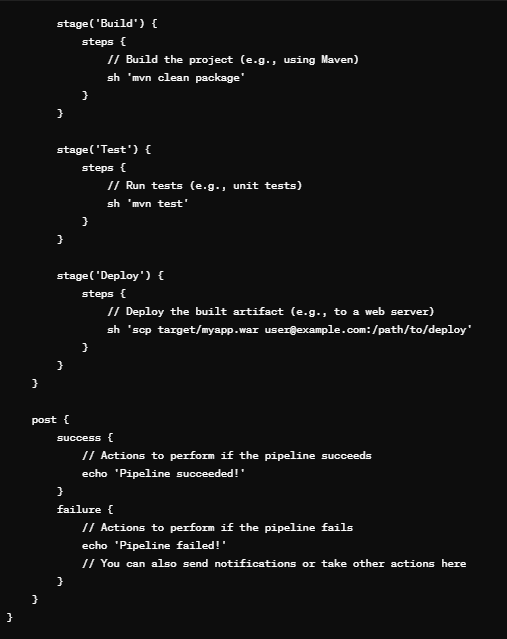
The
pipelineblock defines the entire pipeline.The
agentdirective specifies where the pipeline will execute. In this case, it's configured to run on any available agent.Inside the
stagesblock, eachstagerepresents a distinct step in the build process (e.g., checkout, build, test, deploy).Inside each
stage, thestepsblock contains the actual commands to be executed for that stage.The
postsection defines actions to be taken after the pipeline completes, depending on whether it succeeds or fails.
You can customize this script according to your specific build requirements, such as adding additional stages, parallel execution, environment configurations, error handling, etc.
Q7:-How to create continuous deployment in Jenkins?
Ans:- Continuous Deployment (CD) with Jenkins involves automating the deployment process so that changes to your codebase are automatically deployed to production or a production-like environment after passing through various stages of testing. Here's a basic outline of how to set up continuous deployment in Jenkins:
Prepare Your Application:
- Ensure your application is properly configured for deployment. This may involve creating deployment scripts, defining environment-specific configurations, etc.
Install Required Plugins:
- Depending on your deployment requirements, you may need to install Jenkins plugins such as the "Deploy to Container" plugin, "Deploy to AWS Elastic Beanstalk," "Deploy to Azure App Service," or others. These plugins provide functionality for deploying applications to various platforms.
Set Up Deployment Jobs:
Create a Jenkins job specifically for deployment. This job will be triggered automatically after a successful build of your application.
Configure the deployment job to retrieve the artifact (e.g., WAR file, Docker image) produced by your build job.
Define the deployment steps within the Jenkins job. This could involve copying files to a server, running deployment scripts, pushing Docker images to a registry, etc.
Configure Deployment Triggers:
- Set up triggers for the deployment job. You may want to trigger the deployment job automatically after a successful build of the application or manually at scheduled intervals.
Implement Testing:
- Ensure that your deployment process includes automated testing to validate the application's functionality after deployment. This could involve running smoke tests, integration tests, or other types of tests depending on your application.
Implement Rollback Mechanism (Optional):
- Implement a rollback mechanism in case the deployment fails or if any issues are detected post-deployment. This could involve keeping backups of previous versions, using blue-green deployments, or rolling back changes automatically.
Security Considerations:
- Ensure that your deployment process adheres to security best practices. This may involve securely storing credentials, using encryption for sensitive data, and restricting access to deployment jobs.
Monitoring and Alerts:
- Implement monitoring and alerting mechanisms to detect issues with deployed applications. Set up alerts to notify relevant stakeholders in case of deployment failures or performance degradation.
Documentation and Training:
- Document the deployment process and provide training to relevant team members to ensure they understand how the continuous deployment process works and how to troubleshoot any issues that may arise.
Q 8:-Why we use pipeline in Jenkins?
Ans:- Jenkins Pipeline, also known as Jenkins Workflow, is used for several reasons:
Complex Build Processes: Jenkins Pipeline allows you to define your build process as code, which is particularly useful for complex build workflows involving multiple stages, dependencies, and conditions.
Reusability and Maintainability: By defining your build process as code, you can reuse and version control your pipeline scripts, making them easier to maintain and share across teams. This promotes consistency and reduces the risk of errors caused by manual configuration.
Visualization and Monitoring: Pipelines provide a clear visual representation of the entire build process, including individual stages and their status. This makes it easier to monitor and track the progress of builds, identify bottlenecks, and troubleshoot issues.
Parallel Execution: Jenkins Pipeline supports parallel execution of stages, allowing you to optimize your build process by running multiple tasks concurrently. This can significantly reduce overall build times, especially for large projects with extensive test suites.
Error Handling and Recovery: Pipelines offer robust error handling capabilities, allowing you to define custom actions to be taken in case of build failures or errors. You can implement retry mechanisms, rollback strategies, notifications, and other error recovery mechanisms directly in your pipeline scripts.
Integration with Other Tools: Jenkins Pipeline integrates seamlessly with a wide range of tools and technologies, including version control systems (e.g., Git, SVN), build tools (e.g., Maven, Gradle), container orchestration platforms (e.g., Kubernetes, Docker), and deployment automation tools (e.g., Ansible, Chef). This flexibility enables you to create end-to-end automation workflows that span multiple systems and environments.
Q 9:-Is Only Jenkins enough for automation?
Ans:- No, Jenkins alone is not enough for automation. Jenkins is an automation server that helps us automate the CI/CD process of our software project. However, Jenkins relies on various other tools and plugins to perform different tasks such as source code management, testing, deployment, notification, etc. For example, we may need tools such as Git, Maven, Docker, Kubernetes, etc., to work with Jenkins. Therefore, Jenkins is not enough for automation by itself, but it acts as an orchestrator that integrates with other tools and plugins to achieve automation.
Q 10:-How will you handle secrets?
Ans:-To handle secrets in Jenkins, we can use one of the following methods:
Credentials plugin: This is a built-in plugin that allows us to store and manage secrets such as username and password, SSH key, API token, etc., in Jenkins. We can create credentials in Jenkins either globally or per project and use them in our jobs or pipelines. We can also use a credentials binding plugin to inject credentials as environment variables in our jobs or pipelines.
Secret text plugin: This is an extension of the credentials plugin that allows us to store and manage secrets as plain text in Jenkins. We can create secret text credentials in Jenkins either globally or per project and use them in our jobs or pipelines. We can also use a secret text binding plugin to inject secret text as environment variables in our jobs or pipelines.
HashiCorp Vault plugin: This is an external plugin that allows us to integrate Jenkins with HashiCorp Vault, which is a tool for securely storing and accessing secrets. We can configure Vault credentials in Jenkins either globally or per project and use them in our jobs or pipelines. We can also use the Vault binding plugin to inject Vault secrets as environment variables in our jobs or pipelines.
Q 11:- Explain diff stages in CI-CD setup
Ans:- The different stages in CI-CD setup are:
Code integration: This is the stage where developers merge their code changes from their local branches into a shared repository frequently, usually several times a day. This helps to detect and fix bugs early, improve code quality, and reduce integration conflicts.
Code delivery: This is the stage where the code changes are tested and delivered to a staging environment where they are ready for deployment. This involves automating the testing and delivery stages of the software development lifecycle so that the software can be deployed to any environment at any time with minimal manual intervention.
Code deployment: This is the stage where the code changes are deployed to the production environment where they are accessible to the end-users. This involves automatically deploying the code changes to the production environment as soon as they pass the testing and delivery stages. This enables faster feedback from users, shorter release cycles, and lower deployment risks.
Q 12. Name some of the plugins in Jenkins?
Ans:- Some of the plugins in Jenkins are:
Git plugin: This plugin allows us to integrate Jenkins with Git, which is a distributed version control system. It enables us to clone, fetch, checkout, merge, and push Git repositories in our jobs or pipelines.
Maven plugin: This plugin allows us to integrate Jenkins with Maven, which is a build automation tool for Java projects. It enables us to invoke Maven goals and phases in our jobs or pipelines.
Docker plugin: This plugin allows us to integrate Jenkins with Docker, which is a tool for building and running containerized applications. It enables us to build, run, push, and pull Docker images and containers in our jobs or pipelines.
Kubernetes plugin: This plugin allows us to integrate Jenkins with Kubernetes, which is a platform for managing containerized workloads and services. It enables us to run dynamic agents on Kubernetes pods and deploy applications to Kubernetes clusters in our jobs or pipelines.
Email Extension plugin: This plugin allows us to enhance the email notification functionality of Jenkins. It enables us to send customized email notifications with rich content and attachments in our jobs or pipelines.